Torchlight 0.1
A launcher for Linux. Press a shortcut, type a few letters, and open any app, settings panel, file or folder. 95 of every 100 keystrokes are answered in under 5 milliseconds, even with half a million files indexed.
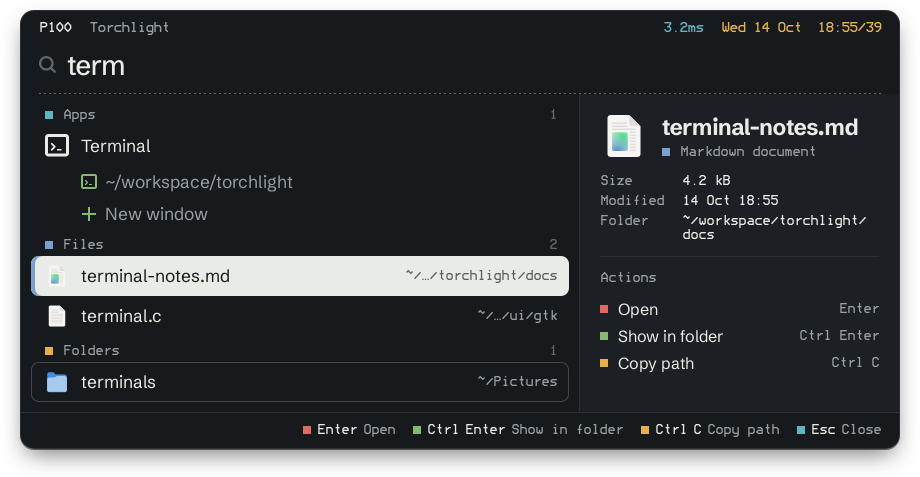
This popup runs in your browser over a small sample home folder, using a simplified copy of Torchlight's matching rules. Type into it, use the arrow keys, or press Esc.
Torchlight is a Spotlight-style launcher I built for my Linux desktop. It forgives typos and abbreviations, lists the open windows of running apps, learns what you open, and keeps up with your files as they change. Only names and paths are indexed, never file contents.
All numbers below come from the project's benchmarks on one machine, a 6-core i7-8700K with 32 GB of memory.
Under 5 ms a keystroke
One screen refresh at 60 Hz takes 16.7 ms. Torchlight's goal is 5 ms for 95 of every 100 keystrokes, with half a million paths in the index.
Time to answer one keystroke, with every test query typed one letter at a time. The big step under 5 ms came from moving search onto its own thread and scoring with Frizbee, a SIMD fuzzy matcher.
One daemon does the work
The popup is only a window. A small daemon, torchlightd, keeps every name in memory, follows your files as they change, and answers each keystroke. Two paths run through it, and only the yellow one is something you wait for.
When you type a letter
- 1The popup sends the query to the daemon over a local socket. It never searches itself.
- 2A newer keystroke drops the older search, so you never wait on a stale one.
- 3The search reads only memory, never the disk or SQL. 95 of 100 answers return within 2.8 ms.
When a file changes
- 1inotify reports the folder that changed, and only that folder is rescanned.
- 2The persistence thread, the only writer, saves the change to catalog.db in one transaction.
- 3A new index version is built on the side and swapped in whole. The file is searchable about 0.11 s later.
Point at a step to find it on the map.
Forgiving search
Four lookup tables find candidates, then only those are scored. Every word you type has to match the name or one of its folders, so work notes finds notes.md inside a work folder.
Among similar matches, your own files come before SDKs, package caches and node_modules, and the things you open often rank higher. On my home folder, files from my own folders went from 29% to 45% of the top ten results for 50 everyday queries.
Always current, quiet when idle
A change on disk rescans only its own folder and is searchable about a tenth of a second later. When nothing changes, almost nothing runs. The biggest wins:
Each row is drawn to its own scale, with the old cost as the full outline.
A look of its own
The design comes from teletext, the pages of news and scores that European TVs showed before the web: blocky letters, small colored squares, and a page number and clock in the top corner, which is why the popup shows P100. Torchlight sets that look on calm colors, in light and dark. This post uses the same fonts and colors; try the Light and Dark switch at the top.
Install it
On Ubuntu 24.04, Linux Mint 22 or newer, or another Ubuntu-based system, download the .deb from the latest release and run the command below. New versions then arrive through your update manager.
sudo apt install ./torchlight_*_amd64.debOn Fedora, Arch, openSUSE, Debian 13 or another distribution with GTK 4.14 or newer, download the .tar.gz from the same page instead. Its installer sets Torchlight up just for you, in ~/.local, without root; to update, run a newer release’s installer.
tar xf torchlight-*-linux-x86_64.tar.gz./torchlight-*-linux-x86_64/install.shThen bind torchlight-gtk --toggle to a shortcut such as Super+Space (the installer prints its full path), and you are done. Desktop setup says where each desktop keeps its shortcuts. Open windows are listed on X11 and on GNOME, KDE Plasma, Cinnamon, COSMIC and the wlroots desktops under Wayland.